Notebook Lined Paper Template: A Practical Guide to Structured Note-Taking for Workflows That Stick
Good note-taking is not about capturing everything—it is about capturing the right things in a way you can actually use later. Whether you are planning a project, studying a new topic, or managing daily tasks, the structure of your notes directly affects how well you retain and apply information. That is where a well-designed Notebook Lined Paper Template becomes more than just a page with lines—it becomes a framework for clearer thinking and better execution.
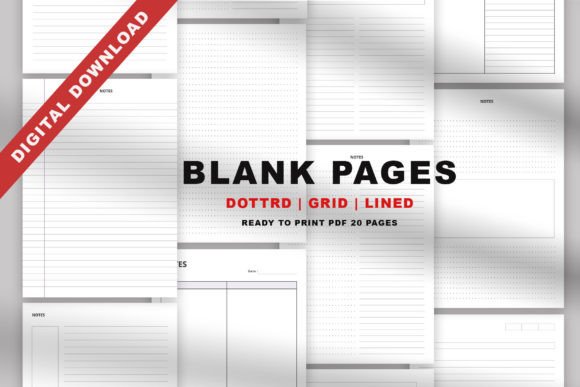
These templates are built around a simple but effective principle: a clean, white background paired with soft, unobtrusive lines that keep your focus on the content, not the formatting. When colors pop and distractions fade, your brain can engage more deeply with what you are writing. With 20 different templates covering lined, grid, dot, lecture, Cornell, column, diagram, box, and miscellaneous layouts, you gain a flexible toolkit that adapts to how you actually work.
Where These Templates Fit Into Your Real Workflow
A template is most valuable when it solves a specific friction point in your process. Think about the moments in your day where information arrives faster than you can organize it—a client call, a brainstorming session, a lecture, or a sudden insight. Without a consistent structure, those details get scattered across sticky notes, digital apps, and loose sheets of paper. The right template gives you a predictable place to land every time.
Before a project begins, you can use the diagram templates to map out relationships between tasks or the Cornell templates to define questions and key points before diving into research. During execution, grid and column templates help you track progress, log metrics, or compare options side by side. After completion, the box and misc templates allow you to reflect, doodle, or capture lessons learned in a format that does not feel rigid.
This before-during-after rhythm works across nearly any context—writing a blog post, planning a marketing campaign, studying for a certification, or simply organizing your week. The templates do not dictate your process; they support it.
Twenty Templates That Match the Way You Think
Having a single notebook style works for some things, but most of us switch between different modes of thinking throughout a day. You might need structured lines for meeting notes in the morning, a dot grid for sketching a wireframe at lunch, and a column layout for comparing vendors in the afternoon. With 20 distinct templates, you can mix and match without ever leaving your preferred workflow.
Lined, Grid, and Dot Templates
These are the foundational layouts. Lined templates keep handwriting neat and consistent, making them ideal for general note-taking, journaling, and to-do lists. Grid templates bring structure to anything that involves coordinates, tables, or precise spacing—think budgets, schedules, or even simple game boards. Dot templates offer a middle ground: they guide placement without the visual weight of full lines, which is perfect for sketching, mind mapping, and bullet journaling.
Lecture and Cornell Templates
If you are learning something new, these two are indispensable. The lecture template provides a clear hierarchy for main ideas, supporting details, and summaries. The Cornell method, with its cue column and summary section, forces you to process information twice: once when you capture it, and again when you condense it. This dual-processing significantly improves recall and is a favorite among students, educators, and self-directed learners.
Column and Diagram Templates
Column layouts excel at comparisons, pros-and-cons lists, and tracking multiple variables side by side. If you are evaluating options for a business decision or comparing features across products, columns keep your thinking straight. Diagram templates, on the other hand, let you visualize relationships, flows, and hierarchies. They are particularly useful for mapping customer journeys, outlining article structures, or brainstorming cause-and-effect scenarios.
Boxes and Misc Templates
Boxes are often overlooked but incredibly practical. They give you defined spaces for tasks, priorities, or separate thought streams on a single page. The misc templates cover everything else—habit trackers, weekly overviews, gratitude logs, and simple doodle pages. These are the templates you reach for when a standard line or grid does not quite fit the task at hand. And with five coloring pages included, you also have a space to reset your mind during a long work session.
How These Templates Interact With Your Existing Tools
A physical template does not exist in isolation. It sits alongside your digital apps, your reference materials, your planners, and your team communication tools. The key is integration without friction.
Print these templates on A4, A5, or US Letter paper, and they fit directly into standard binders, ring planners, or clipboards. Use them as inserts inside a bullet journal or as standalone sheets for specific projects. Because they are non-editable PDF and JPEG files, you can print as many copies as you need without worrying about version control or file corruption. If you prefer a hybrid workflow, you can scan a completed page and attach it to a digital project board or note app.
For professionals who work across platforms, the ability to print a fresh copy of a Cornell template or a column layout means you are not locked into any one system. You can keep your analog notes organized while still syncing conclusions to your digital tools. This reduces the mental overhead of deciding which format to use and lets you focus on the content itself.
Practical Implementation Tips for Long-Term Use
Getting the most out of these templates requires a small amount of upfront organization, but the payoff is consistency across weeks and months.
Start by sorting the 20 templates into categories that match your typical activities. For example, keep a stack of lined and Cornell templates for meetings and learning, grid and column templates for planning and data, and dot and diagram templates for creative work. Store them in separate folders or tabbed sections of a binder so you can grab the right one without flipping through unrelated pages.
Use the three cover pages to label different notebooks or sections by project, quarter, or theme. This simple organizational step prevents your notes from becoming a blur of disconnected pages. When you revisit a notebook weeks later, a clear cover tells you exactly what that volume contains.
Resist the urge to overcomplicate your setup. The templates are already designed with a white background and soft lines to reduce visual noise. Keep your writing tools simple—a black pen and one accent color for highlights or emphasis. The moment you start layering too many colors or decorations, you risk losing the clarity that these templates are meant to provide.
Quality Control and Consistency Over Time
When you print your own templates, small variations can accumulate across batches—slight misalignments, inconsistent margins, or paper that does not handle ink the same way. To maintain quality, test a single page of each template on your printer and paper combination before printing a full set. Adjust your printer settings for borderless or border-accurate output if needed, and use paper that is thick enough to prevent ink bleed-through, especially if you use fountain pens or markers.
Because these are non-editable files, you do not have to worry about accidental formatting changes. Every print is identical to the original design. This is a significant advantage over editable templates where a stray click can shift a margin or delete a line. For professionals who need consistent outputs across multiple notebooks or team members, this predictability saves time and frustration.
Over the long term, rotate through the different templates to keep your note-taking adaptable. If you always reach for the lined template, challenge yourself to use the diagram template for one project or the box template for one week. This variety keeps your brain engaged and may reveal a layout you had not considered useful before.
Real Use Cases Across Different Roles
An entrepreneur managing multiple initiatives can use column templates to compare supplier quotes and grid templates to track quarterly goals. A blogger mapping out content can use diagram templates for topic clusters and Cornell templates to take notes on competitor research. A freelancer juggling client projects can rely on lined templates for daily to-do lists and misc templates for time-blocking experiments. A marketer analyzing campaign performance can use box templates to separate metrics by channel and lecture templates to summarize industry reports.
The common thread is that each user adapts the templates to their existing rhythm. No one is forced into a rigid system. You pick the layout that matches the task at hand, print it, and go. This flexibility is what makes a template collection genuinely useful across a broad audience.
Preparing for Smooth Daily Use
Keep a small stack of the four or five templates you use most often in a dedicated drawer or tray near your desk. When inspiration strikes or a meeting starts, you can grab a page without breaking your flow. The same goes for your portable carry—slip a few A5 sheets into your bag so you are always ready, whether you are at a coffee shop, a co-working space, or a client's office.
Because the files are available in both PDF and JPEG formats, you can also store them on a tablet or phone for quick reference. While the primary use is print-based, having a digital backup means you can recreate a template even if you run out of physical copies.
Ultimately, the goal is to reduce the distance between having a thought and capturing it. When your template is ready, familiar, and aligned with your workflow, that distance shrinks to nearly zero. And when your colors pop against a clean white background, the act of writing itself becomes slightly more satisfying—which means you are more likely to keep doing it.