Teacher Journal KDP Interior Template: A Practical Guide to Evaluating Your Options
Creating a teacher journal for print-on-demand or personal use involves more than just writing prompts and adding decorative elements. The structure, page count, formatting, and file type all influence how the final product feels in hand and how easily it can be published. The Teacher Journal KDP Interior Template has gained attention among educators and self-publishers alike, but understanding what makes it distinct and when it suits your needs requires a closer look at its design, flexibility, and limitations.
This article walks through the key features of this template, compares it with other common approaches to building teacher journals, and helps you decide whether it aligns with your project goals. Whether you are preparing a resource for your own classroom or planning to publish on Amazon KDP, the considerations below will support a more informed decision.
What the Teacher Journal KDP Interior Template Offers
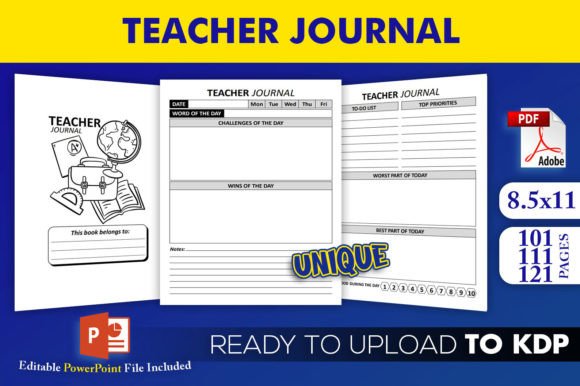
At its core, this template provides a ready-to-use interior layout designed specifically for teacher journals. The package includes an editable PowerPoint source file (PPTX) along with three PDF interiors at 101, 111, and 121 pages. The trim size is fixed at 8.5 by 11 inches, with no bleed, which simplifies the upload process for KDP because you do not need to account for extra margin space beyond the trim edge.
The files have been tested on KDP, which means the formatting aligns with Amazon's specifications for print interiors. For someone who wants to avoid the trial-and-error phase of setting margins, gutters, and page counts, this eliminates a common pain point. The high-resolution interiors also ensure that any text, lines, or simple graphics print clearly without pixelation.
One of the more practical aspects of this template is the inclusion of multiple page-count options. A 101-page journal feels noticeably thinner than a 121-page one, and each count suits a different use case. A shorter journal might work well for a single semester or a focused goal-setting period, while a longer one can accommodate a full academic year or more extensive note-taking.
How the Template Compares to Building a Journal from Scratch
Creating a teacher journal from scratch in word processing or design software gives you complete control over every detail. You can choose any trim size, set your own margins, design custom layouts for each page, and select fonts and colors without restriction. However, this approach requires a solid understanding of print formatting, bleed settings, and KDP's file requirements. A small mistake in margin placement can cause text to be cut off or appear too close to the edge, leading to a rejected upload or a poor-quality print.
The Teacher Journal KDP Interior Template removes most of that technical overhead. Because it comes as an editable PowerPoint file, you can modify text, add your own prompts, adjust colors, or insert images without learning complex software. The three pre-made PDFs are ready to upload if you prefer a quicker path. For someone who values speed and simplicity over total design freedom, this template offers a clear advantage.
That said, starting from scratch allows you to create a journal with unconventional dimensions or unique page structures. If your concept requires a square format, a smaller planner size, or interactive elements like perforated tear-out pages, a pre-built template may not accommodate those needs without significant rework. In that case, building your own layout or commissioning a custom design might be the better route.
Comparing with Other Pre-Designed Journal Templates
Not all pre-designed journal templates are the same. Some come as Adobe InDesign files, others as Canva templates, and still others as Microsoft Word documents. Each format has its own learning curve and editing capabilities. The PowerPoint format used here is widely accessible. Most educators and self-publishers already have some familiarity with PowerPoint, so the barrier to entry is low.
Another point of comparison is page count flexibility. Many journal templates offer only a single page count, which forces you to either accept that length or manually duplicate pages to extend the journal. Having three distinct page counts within one package gives you room to choose based on your audience or content volume. For example, a teacher journal aimed at daily reflection might need more pages than one intended for weekly check-ins.
The absence of bleed in this template is worth noting as well. Bleed refers to the extra area beyond the trim line that ensures colors or images extend to the very edge of the page. No-bleed interiors are simpler to set up and less prone to trimming errors, but they leave a white border around the content. If you want full-bleed designs with background colors or edge-to-edge imagery, you would need a template that includes bleed margins or create one yourself. For a journal that is primarily text-based with simple line art or monochrome layouts, no-bleed is perfectly adequate and often preferred for readability.
Strengths That Make This Template a Practical Choice
One strength that stands out is the testing on KDP. Even experienced self-publishers occasionally run into formatting rejections due to margin or file issues. Knowing that these files have already passed KDP's checks saves time and reduces frustration. The high-resolution interiors also ensure that any scanned elements or detailed line work remains crisp, which matters if your journal includes handwriting practice lines, graphs, or detailed diagrams.
The trim size of 8.5 by 11 inches is the standard US letter size. This is larger than many personal journals, but it works well for teacher planners because it provides ample room for lesson plans, attendance tracking, note-taking, and other classroom management tasks. The larger page size also makes the journal feel substantial without being overly thick.
Another practical advantage is the editable source file. You can customize headings, add your own content, change the order of sections, or insert new pages. This flexibility means the template can serve as a foundation rather than a fixed product. If you want to create a series of journals with different themes or grade-level focuses, you can reuse the same template structure and update the content.
Tradeoffs and Limitations to Consider
No template is a perfect fit for every project, and this one has its tradeoffs. The fixed trim size means you cannot produce a smaller or larger journal without modifying the file extensively. If your audience prefers a compact journal that fits in a bag or a larger workbook style, you would need to adjust the layout manually or look for a template with a different size.
The no-bleed format, while simpler, also limits design possibilities. If you envision a journal with colored backgrounds, decorative borders that reach the edge, or full-page illustrations, you will need to add bleed margins yourself. This is not difficult but does require basic knowledge of print setup.
Page counts of 101, 111, and 121 are specific numbers. These are not arbitrary; they likely represent common lengths that work well for KDP's spine width calculations and printing costs. However, if your content naturally falls outside these numbers, you may end up with blank pages at the end or need to condense material. A template that offers more granular page count options might suit a project with very specific content requirements.
Finally, PowerPoint, while accessible, is not a dedicated layout tool. Managing complex page designs with many text boxes, images, or tables can become cumbersome. If your journal includes heavily structured pages with multiple columns, timetables, or interactive elements, software like InDesign or Affinity Publisher might give you better control. The template works best for straightforward layouts with consistent page structures.
When This Template Is Likely the Right Choice
The Teacher Journal KDP Interior Template is a strong option when you need a reliable, tested foundation that can be customized without specialized software. If you are new to self-publishing or have limited time to invest in formatting, this template minimizes the technical hurdles. The three page-count options give you room to experiment with different lengths without purchasing multiple products.
It is also a good fit if you plan to create a journal that focuses on structured content like weekly prompts, goal-setting pages, lesson planning sections, or reflection logs. The standard trim size and no-bleed format keep the focus on readability and usability rather than decorative elements. For a teacher journal intended for daily or weekly use, this practical orientation often matters more than elaborate design.
If you are creating a resource for your own classroom rather than for sale, the editable PowerPoint file lets you tailor the journal to your specific curriculum, schedule, or teaching style. You can add your own prompts, modify section headers to match your subjects, or remove pages that do not apply. This adaptability makes the template useful beyond just publishing.
When You Might Need a Different Approach
If your project requires a non-standard trim size, full-bleed designs, or a very specific page count that falls outside the provided options, you may need to look for a different template or create your own layout. Similarly, if you plan to include complex page elements such as multi-layered tables, interactive checkboxes, or heavy image usage, a template built in a more advanced design tool might serve you better.
Another scenario is when you want to publish a series of journals with a consistent brand but varying sizes. For example, a teacher planner in letter size and a companion gratitude journal in a smaller format would require two separate templates unless you are comfortable modifying the file extensively. In that case, investing in a customizable template system or learning a flexible design tool could save time across multiple projects.
Budget also plays a role. Pre-designed templates are generally affordable, but if you plan to create many journals, the cost of purchasing individual templates for each design can add up. Learning to build your own interiors from scratch involves an upfront time investment but can be more economical at scale.
Key Decision Factors to Weigh
When evaluating this template or any similar product, consider the following:
- Your comfort with design software. If you prefer drag-and-drop editing, the PowerPoint format is a low-friction option. If you are already proficient in InDesign, you might find more powerful alternatives worth the learning curve.
- The importance of page count. Having three options is helpful, but verify that one of them aligns with your content volume. Adding or removing pages in PowerPoint is possible but can affect the overall layout consistency.
- Print quality needs. High-resolution interiors are a plus, but ensure that your own images or additions are also high resolution to maintain consistency.
- Time vs. control. This template leans heavily toward saving time. If you are willing to invest more hours for greater design control, a custom build or advanced template might be appealing.
- Audience expectations. Teachers who use planners often appreciate practical layouts with ample writing space. The 8.5x11 size is conducive to that, but if your audience expects a more compact format, you may need to adapt.
Practical Examples of Use Cases
Imagine a first-year teacher who wants to create a semester-long reflection journal to track classroom experiences, successes, and challenges. Using the 101-page version, they could allocate one page per day for a 100-day school term, with a title page and a closing page. The editable PowerPoint file allows them to add prompts like "What worked well today?" or "What would I change?" without designing from scratch.
Another scenario involves an experienced educator who wants to publish a series of grade-specific teacher planners on KDP. Using the 121-page version, they can create a comprehensive planner with monthly overviews, weekly lesson plan pages, student roster sheets, and notes sections. The multiple page counts let them test a shorter version first, gather feedback, and then release a more detailed version later.
A self-publisher who focuses on educational resources might use this template as a starting point for a line of teacher journals. Because the template is editable, they can produce variations for different subjects or grade levels by swapping out content while keeping the same structural layout. This consistency helps build brand recognition and streamlines production.
Making Your Decision
The Teacher Journal KDP Interior Template occupies a practical middle ground between building a journal from scratch and using a completely fixed design. It offers tested files, multiple page counts, and an editable format that does not require expensive software. For many educators and self-publishers, that combination is exactly what they need to move forward with confidence.
If your priority is getting a functional, well-formatted teacher journal into production quickly, and you are comfortable working within the constraints of a standard trim size and no-bleed layout, this template is worth considering. If you need extensive design freedom or very specific formatting features, exploring other options or building your own interior may better serve your vision.
Ultimately, the right choice depends on your goals, your timeline, and how much control you want over the final product. Weighing the tradeoffs described here will help you decide whether this template aligns with your project or whether a different approach is a better fit.