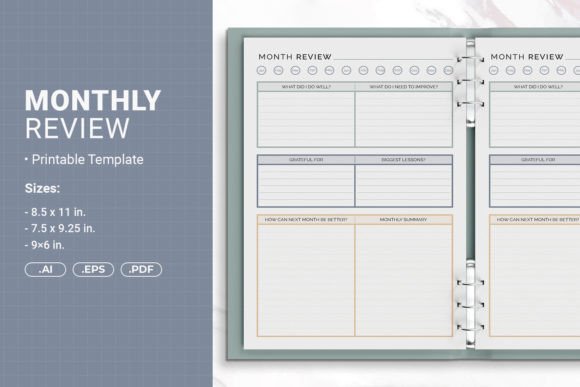
Monthly Review Printable Template for Self-Publishing
Creating a professional-looking book or planner from scratch can feel overwhelming, especially when you are just starting out. The Monthly Review Printable Template offers a practical starting point that removes much of the guesswork. Whether you are designing a personal journal, a business planner, or a book for Amazon KDP, this template provides structure without sacrificing creative freedom. It comes in three sizes, includes multiple file formats, and is built with print-ready specifications that save time and reduce errors.
What the Monthly Review Printable Template Offers
At its core, this template is a pre-designed layout that helps you organize content for monthly reviews, reflections, or planning. It is not just a blank page with lines. The template includes carefully considered margins, bleed areas, and spacing that align with professional printing standards. This means you can focus on your content and design choices rather than worrying about technical details like trim marks or binding offsets.
The package includes Adobe Illustrator (AI) files that are fully open source, an EPS file for compatibility with older software, and PDF files ready for immediate use. Having all three formats means you can edit the template in the application you prefer, whether that is Illustrator, Affinity Designer, or even free alternatives like Inkscape that support EPS imports. The PDF version works straight out of the box for quick printing or upload.
Three Sizes for Different Projects
One size rarely fits all when it comes to printed materials. The template addresses this by offering three distinct dimensions:
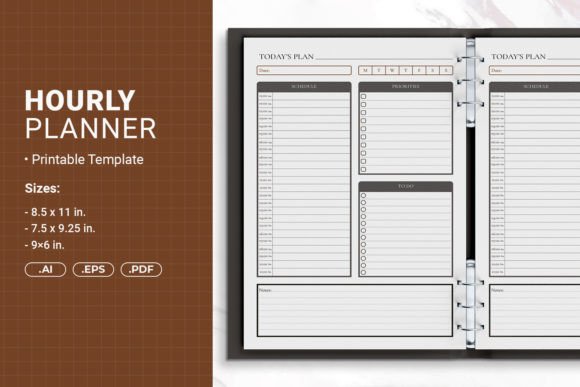
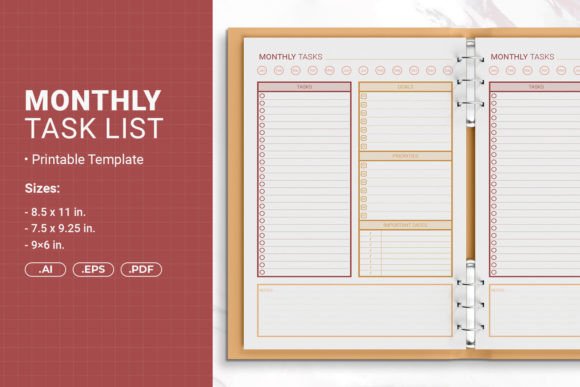
- 8.5 x 11 inches (215.9 x 279.4 mm) – Standard letter size, ideal for binders, workbooks, and detailed monthly reviews that need extra space.
- 7.5 x 9.25 inches (190.5 x 234.95 mm) – A slightly smaller format that feels substantial without being bulky. Great for professional reports or portfolio-style books.
- 6 x 9 inches (152.4 x 228.6 mm) – The classic trade book size, popular on Amazon and perfect for journals, guided planners, or pocket-sized monthly reviews.
Choosing the right size depends on your audience and purpose. A 6x9 book fits comfortably in hand and looks like a standard paperback. The 8.5x11 option works well for worksheets, exercises, or pages where readers need room to write. The 7.5x9.25 sits somewhere in between and offers a unique presence on a bookshelf.
Print-Ready for Amazon KDP and Home Printing
Self-publishing authors often struggle with formatting requirements when uploading to Amazon KDP. The template comes with PDF files that include bleed, which is the extra margin around the page that gets trimmed off during production. Without proper bleed, your design elements might end up cut off or misaligned. This template handles that automatically, so your monthly review pages look exactly as intended after printing.
For those who prefer to print at home or at a local print shop, the safe margin design also accommodates hole punching and binding. You can place the pages in a ring binder or spiral bind them without losing content near the edges. This flexibility makes the template suitable for both commercial publishing and personal use.
Who Benefits from Using This Template
The Monthly Review Printable Template appeals to a wide range of users because it balances structure with customization. Here are some examples of who might find it valuable:
- Self-publishing authors – If you are creating a guided journal, a gratitude log, or a productivity planner, this template gives you a professional framework without requiring advanced design skills.
- Small business owners and entrepreneurs – Use it to create monthly review booklets for clients, team members, or workshop participants. The clean layout reinforces your brand identity.
- Educators and coaches – Build custom workbooks for students or coaching clients. The monthly review format encourages reflection and goal tracking.
- Freelancers and creatives – Design personal planners, habit trackers, or project logs. You can print just what you need for each month.
- Hobbyists and journal enthusiasts – If you love bullet journaling or keeping monthly reviews but want a clean starting point, the template saves you from drawing layouts by hand.
The template supports goals like staying organized, tracking progress, reflecting on achievements, and planning ahead. These are universal needs across personal and professional contexts.
Practical Use Cases for Monthly Reviews
Monthly reviews are a powerful habit for anyone who wants to stay intentional about their time and energy. With this template, you can create a dedicated space for that practice. Here are realistic ways people use it:
- Personal reflection journals – At the end of each month, write about what went well, what challenged you, and what you learned. The template provides consistent formatting so you can look back over the year easily.
- Business performance trackers – Entrepreneurs can document monthly revenue, client feedback, marketing results, and goals for the upcoming month. The professional layout makes these records easy to share with partners or investors.
- Classroom or workshop materials – Teachers can print monthly review sheets for students to reflect on their learning progress. The three size options make it easy to fit into existing binders or folders.
- Health and wellness logs – Track mood, exercise, sleep, or nutrition trends month by month. The clean design keeps the focus on your data without distracting elements.
- Content planning for bloggers and marketers – Use the template to plan blog posts, social media content, and email campaigns on a monthly basis. The printed format offers a break from screen-based planning.
The template adapts to each use case because you control the content. You can add your own headings, colors, graphics, or prompts inside the AI or EPS files. The structure stays intact, but the personality comes from you.
Customization Options and Design Freedom
One of the biggest advantages of this template is that it is not locked down. The AI files are open source, meaning you can modify every element. Change fonts, adjust colors, rearrange layout sections, or insert your own artwork. If you are comfortable with vector editing software, the possibilities are nearly endless.
For people who prefer a simpler approach, the PDF files work well without any editing. You can print them as-is and fill in the pages by hand. This is especially useful for educators or workshop facilitators who need multiple copies quickly.
The safe margin for hole punching is a thoughtful detail. When you print and bind the pages yourself, you do not have to guess where the holes will fall. The content stays clear of the binding zone, so no text or design elements get lost in the gutter or punched through.
Important Considerations Before You Start
While the template is designed to be user-friendly, there are a few things to keep in mind to get the best results:
- Software compatibility – The AI files require Adobe Illustrator or a compatible vector application. If you do not have access to Illustrator, the EPS file is a good alternative, though some free programs may not support all features perfectly. The PDF files are the safest bet for universal access.
- Bleed and trim understanding – If you upload to Amazon KDP, make sure you select the correct paper size and bleed settings. The PDF with bleed includes extra space that will be trimmed. Do not place critical content in the bleed area.
- Test print first – Before printing a large batch, print one copy to check alignment, margins, and overall appearance. This is especially important if you are using the template for commercial purposes.
- Binding method – The safe margin works for standard three-ring binders and spiral binding. However, if you plan to use a different binding style, double-check that the inner margin is sufficient for your chosen method.
- Color considerations – The template is designed in black and white or simple color schemes, but you can customize it extensively. If you are printing at home, remember that darker designs use more ink.
These points are not obstacles. They are simply practical steps that help you avoid common mistakes and save time in the long run.
Why This Template Stands Out
There are many printable templates available online, but this one combines several features that make it especially useful. The inclusion of three file formats means you are not locked into a single workflow. The three sizes cover the most common book dimensions used in self-publishing and personal printing. The print-ready specifications with bleed and safe margins eliminate the technical headaches that often trip up beginners.
More importantly, the template respects your creativity. It does not force a rigid design or limit what you can do. Whether you want a minimalist monthly review sheet or a richly illustrated planner, the template serves as a foundation that supports your vision rather than constraining it.
Getting the Most Out of Your Monthly Review Template
To make the template truly your own, spend some time thinking about what kind of monthly review format works best for your audience or personal style. Do you prefer open-ended prompts or structured checkboxes? Would colorful headers help organize sections, or does a clean black-and-white layout feel more professional? Experiment with different fonts, spacing, and graphic elements in the AI or EPS files.
If you plan to sell your monthly review book on Amazon, consider adding a short introduction explaining how to use the pages. Readers appreciate guidance, especially for reflective practices. A consistent format across months also helps build a habit, since users know exactly where to find each section.
For personal use, you might print a single copy and fill it in month after month, or print fresh sheets each period and bind them at the end of the year as a keepsake. The choice is yours, and the template adapts effortlessly.
The Monthly Review Printable Template is more than just a layout. It is a tool that bridges the gap between an idea and a finished product. For anyone who wants to create professional-looking books, planners, or journals without spending weeks on formatting, it offers a reliable and flexible solution.