Evaluating the KDP Cover Template 6×9 in 100 Pages for Your Publishing Needs
When preparing a paperback for Amazon’s Kindle Direct Publishing (KDP), the cover is one of the most critical elements. A cover that does not match the exact trim size, spine width, and bleed requirements can lead to rejection, delays, or a poor customer experience. The KDP Cover Template 6X9 in 100 Pages is a pre‑designed file that aims to solve this exact sizing problem. This article provides an objective evaluation of what this template offers, who may benefit from it, and when alternative approaches might be more suitable. The goal is to help you decide whether this template aligns with your specific publishing workflow and project requirements.
What Is the KDP Cover Template 6×9 in 100 Pages?
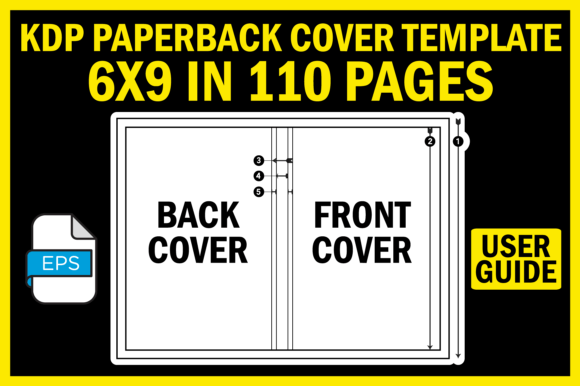
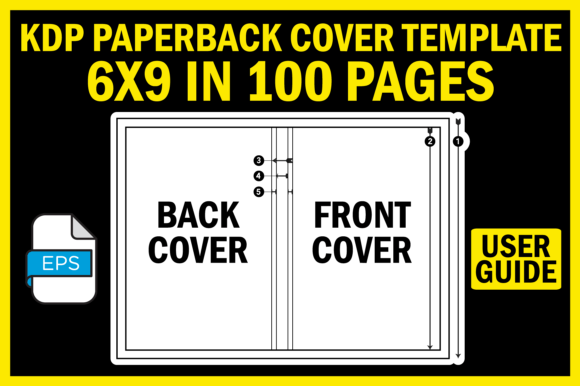
This template is a ready‑to‑use cover layout for a paperback book with a final trim size of 6 inches by 9 inches and an interior of 100 pages. The product typically includes an EPS file (Encapsulated PostScript) at 300 DPI resolution, a cover size guide in JPEG format, and a text file with user instructions. The EPS file contains the precise dimensions for the front cover, back cover, and spine, along with bleed and safe zones. The 100‑page interior dictates a specific spine width, which the template accounts for in its layout. By using this file, a publisher can drop their artwork into the correct frame without manually calculating margins or spine thickness.
Why Publishers Consider This Template
Several practical reasons motivate self‑publishers to look for a dedicated template like this one:
- Eliminates guesswork: Calculating spine width for a given page count and paper type can be tedious. This template pre‑sets the spine for 100 pages of standard 60 lb or 50 lb cream paper, saving time.
- Reduces formatting errors: KDP has strict requirements for bleed (0.125 inches) and margins. A properly constructed template ensures your design stays within acceptable boundaries.
- Provides a professional workflow: The EPS format is compatible with vector editing software such as Adobe Illustrator, Inkscape, or Affinity Designer, allowing for precise scaling and editing without loss of quality.
- Includes a visual guide: The cover size guide (JPEG) helps you understand where each part of the cover goes, which is especially useful if you are new to book cover design.
Benefits and Strengths of the Template
When used correctly, the KDP Cover Template 6X9 in 100 Pages offers several advantages that can improve your publishing experience:
- Precision at 300 DPI: The high resolution ensures that printed text and images remain sharp, avoiding pixelation that can occur with low‑resolution files.
- Time savings: You skip the step of manually setting up a document with the correct dimensions and guides, which can be error‑prone for a 6×9 book.
- Consistent branding across a series: If you publish multiple 6×9 books with 100 pages, using the same template creates uniform cover layouts, reinforcing your brand.
- Support for beginners: The included readme and size guide lower the learning curve for those who are unfamiliar with KDP’s cover specification.
Trade‑Offs and Limitations
No template is perfect for every situation. Here are some considerations to keep in mind:
- Fixed page count: The template is designed exclusively for a 100‑page interior. If your book ends up with 101 pages or 99 pages, the spine width will be incorrect, and you will need to adjust it manually or get a different template.
- Paper type assumptions: Spine width depends on paper thickness. The template likely assumes standard cream or white paper. If you use a specialty paper or a different weight (e.g., 60 lb vs. 50 lb), the spine measurement may differ slightly.
- Requires vector software: The EPS file is not directly editable in basic image viewers or simple design tools like Canva (free version). You need software capable of handling vector files, which may be an additional expense or learning curve.
- No interior content: This is a cover template only. You must still prepare the interior manuscript separately. Some publishers prefer an all‑in‑one solution that includes interior formatting guidance.
When This Template Is a Strong Fit
The KDP Cover Template 6X9 in 100 Pages is most useful in the following scenarios:
- Your book is exactly 100 pages. If you have a manuscript that produces a 100‑page interior (including front matter, chapters, and back matter) and you intend to use standard 6×9 trim, this template fits perfectly.
- You are a beginner or occasional publisher. If you are publishing your first or second book and want to avoid the technical details of cover setup, the template saves you from common mistakes.
- You use professional design software. If you already work with Illustrator, Inkscape, or Affinity, the EPS file integrates seamlessly into your workflow.
- You plan a series of 100‑page books. For a trilogy or series where each book has the same page count, you can reuse the template with minor artwork changes, ensuring spine alignment on shelves.
When Alternatives May Be Worth Considering
In some cases, you might be better served by a different approach. Consider the following situations:
- Your book has a different page count. If your manuscript is 120 pages or 80 pages, this template will not be accurate. You would need a template tailored to that specific page count or calculate the spine width yourself using KDP’s free cover calculator.
- You lack vector editing software. If you only have access to basic tools (e.g., Microsoft Word, Canva, or Photoshop without EPS support), you may struggle to open and edit the EPS file. Some alternative templates come in PDF or PNG format with layers that are easier to handle.
- You want maximum flexibility. Publishers who frequently vary page counts or trim sizes may prefer building their own template or using a tool that auto‑generates covers based on input parameters (such as Book Cover Maker or Canva’s KDP templates).
- You need a cover for hardcover or different trim. This template is specifically for 6×9 paperback. If you are publishing a 5.5×8.5 book or a hardcover edition, you need a different template entirely.
Practical Decision‑Making Insights
To determine whether this template is right for you, follow these steps:
- Verify your final page count. Use KDP’s Kindle Create or your word processor to generate a final manuscript. Check the exact page number when exported as PDF. If it is not 100, the spine width will differ.
- Confirm your paper type. KDP’s cover calculator (available in your Bookshelf) will show the exact spine width for your chosen paper. Compare that to the template’s spine. The difference is usually fractions of an inch, but it can affect trim.
- Check your software compatibility. If you do not have vector software, consider downloading a free trial or using open‑source Inkscape. Alternatively, look for a template in a format you can use.
- Consider the learning curve. The template itself is straightforward, but you still need to place your design elements within the defined safe zones. The included readme and guide are helpful, but you should budget time to understand bleed and margin concepts.
Exploring the Store for More Resources
The template is offered as part of a larger store that provides additional resources. If you find that the 6×9 100‑page template suits your needs, you may also want to browse other sizes and page counts for future projects. Having a consistent set of templates for different trim sizes can streamline your publishing process. However, be mindful that each template is optimized for a specific combination, so you should always double‑check the specification before purchasing or downloading.
Final Evaluation: Is It Right for You?
The KDP Cover Template 6X9 in 100 Pages is a practical tool for a specific niche: publishers with a 100‑page, 6×9 paperback who want to avoid dimensional errors. Its strengths lie in precision, convenience, and the inclusion of high‑resolution vector files. The trade‑offs are its inflexibility regarding page count and the requirement for compatible software. For anyone who matches the exact page count and has the right tools, it can significantly reduce stress and improve cover quality. If your book does not meet those parameters, or if you prefer a more flexible or template‑free workflow, exploring other options—such as KDP’s free cover templates or third‑party cover generators—may yield a better fit.
Ultimately, the best choice depends on the specifics of your project and your comfort level with design software. By carefully assessing the page count, paper type, and your own skills, you can make an informed decision that supports a smooth publishing experience.