Child Support Payment Tracker Interior: Manage Payments with Confidence
Keeping track of child support payments doesn’t have to be a source of stress. Whether you are a parent managing your own records, a guardian overseeing obligations, or a content creator publishing organizational tools, having a structured system makes all the difference. The Child Support Payment Tracker Interior is a ready-to-use template designed to bring clarity and order to what can often become a messy financial task. It’s more than just a logbook—it’s a practical asset that supports accountability, transparency, and peace of mind.
This interior is built for the Amazon KDP platform, meaning it is formatted and tested for print-on-demand publishing. You get a complete package: multiple file formats, high-resolution interiors, and a clean layout without bleeds. But beyond the technical specifications, what does this tracker actually look and feel like in practice? And how can you use it effectively, whether you are publishing it or using it yourself?
A Closer Look at the Child Support Payment Tracker Interior Design
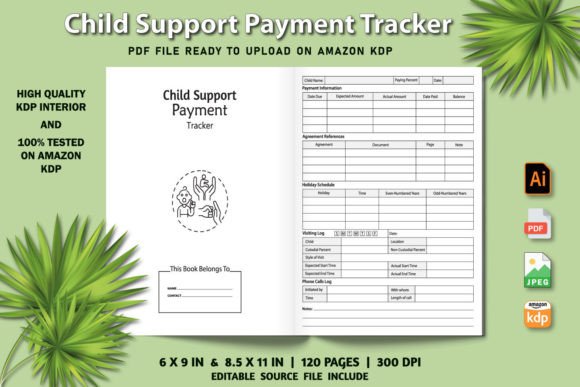
When you open this interior, the first thing you notice is its clarity. The layout is intentionally minimal, avoiding visual clutter so that the information itself stands out. Each page follows a consistent structure with clearly labeled fields for payment dates, amounts, payer and recipient details, method of payment, and notes. The grid is spacious enough to write in by hand yet compact enough to fit months of records into a manageable book.
Visually, the interior leans toward a professional, neutral aesthetic. The typography is clean and functional—think a straightforward sans serif that prioritizes readability over decoration. This is not a display font or a script font meant to grab attention; it is a working typeface that supports long-term use. The line spacing, column widths, and heading sizes are all calibrated to reduce eye strain while making data easy to scan at a glance. For a publisher, this means the interior appeals to a broad audience. For a parent using the tracker, it means less friction when filling out entries over weeks and months.
The personality of this design is dependable and no-nonsense. There is no whimsical decoration or trendy ornamentation. It feels like a tool you might find in a professional office—reliable, straightforward, and built to last through repeated use. That said, the interior also includes an intro page that sets the context, giving the book a finished, polished feel. This small touch adds a layer of professionalism that can elevate the entire product, especially if you are publishing it on KDP where first impressions matter.
Visual Characteristics That Support Consistent Use
One of the strongest aspects of this interior is how its design encourages consistent tracking. The layout repeats predictably from page to page, so once you understand the structure, you can fill in entries quickly without reorienting yourself each time. This predictability is crucial for habit formation. When a tracker is easy to use, you are more likely to keep using it.
The headers and section dividers use a subtle weight variation—slightly bolder for categories like month or year, lighter for individual entry fields. This creates a gentle visual hierarchy that guides the eye without shouting. There is no unnecessary color or shading, which keeps printing costs low and ensures the interior looks clean even in grayscale. For KDP publishers, this is a practical advantage: your customers get a professional product that works well in both black-and-white and color print runs.
Where This Tracker Adds the Most Value for Different Creators
The Child Support Payment Tracker Interior serves multiple audiences, and understanding these use cases helps you position it effectively if you are publishing, or choose the right tool if you are buying.
For KDP publishers and content creators, this interior is a ready-to-upload asset. You do not need to spend hours designing a layout from scratch or testing formats for Amazon’s requirements. The files include AI, PDF, and JPG formats at 300 dpi, plus an intro page. The absence of bleed means you can upload straight to KDP without trimming or adjusting margins. This is a time-saver, especially if you are building a catalog of organizational planners and trackers. You can customize the cover to match your brand identity, pair it with complementary fonts for titles or headings, and list it quickly. For publishers who value efficiency, this interior is a solid addition to a low-content book lineup.
For entrepreneurs and small business owners who offer financial coaching, mediation, or family law services, this tracker can be a lead magnet or a client resource. You can brand it with your logo, print copies for clients, or offer it as a digital download. The professional layout reinforces your credibility and shows that you take financial organization seriously. It also saves you the trouble of designing a tracker yourself—just customize the cover and distribute.
For parents and guardians managing payments directly, this interior provides a physical record that complements digital banking statements. You can keep a printed copy for quick reference, note any discrepancies, and track ongoing obligations without logging into multiple apps. The off-screen, paper-based approach appeals to people who prefer tangible records or who want a backup to digital files. The simple layout means you do not need training or instructions to start using it.
Designing for Accountability and Transparency
A well-designed tracker does more than store information—it creates accountability. When you see each payment recorded in a structured format, gaps or inconsistencies become obvious. This interior’s layout encourages you to fill in every field, which builds a complete picture over time. For parents who may need to present payment records in legal or mediation settings, having a clean, professional log can make a real difference.
The interior’s design also supports transparency between co-parents or guardians. If both parties use the same format, comparing records is straightforward. The neutral, professional tone of the layout avoids any appearance of bias—it simply records what happened, when, and how. This can reduce conflict by focusing the conversation on data rather than memory or interpretation.
How the Layout Influences Tracking Accuracy and Accountability
Tracking accuracy depends on how easily you can enter and retrieve information. The Child Support Payment Tracker Interior uses a tabular layout with logical groupings. Each entry row includes space for the payment date, amount, payment method, and a notes column. This structure mirrors standard accounting formats, which means it feels familiar even to people who do not have a financial background.
The font choices in the interior are intentionally restrained. Rather than using a decorative script or handwriting style, the design relies on a clean, legible typeface that works well at small sizes. This is important because tracker pages often contain dense information. A whimsical or overly stylized font would reduce readability and slow down scanning. By sticking to a neutral, functional typography, the interior keeps the focus on the data. This approach also makes the interior feel more serious and trustworthy—qualities that matter when dealing with financial obligations.
For publishers, this means the interior will appeal to customers who value usability over aesthetics. It is not trying to win design awards; it is trying to help people manage their payments without friction. That said, the clean look also makes it easy to pair with different cover designs. Whether your cover uses a bold display font, a modern geometric sans, or a warm handwritten style, the interior’s understated layout will complement it without clashing.
Readability and Visual Hierarchy in the Payment Log
Every page follows a consistent grid. The header area clearly indicates the month or time period, and the column labels are repeated on each page so you never have to flip back to remember what a field means. This repetition might seem minor, but it dramatically reduces the cognitive load during long tracking sessions. You do not have to reconstruct the structure each time you open the book.
The weight contrast between headings and data fields is subtle but effective. Headers use a slightly bolder weight, while the entry lines remain light so that your handwriting stands out against the printed text. This is a thoughtful touch that many users will appreciate without consciously noticing it. It makes the page feel open and inviting rather than crowded.
Practical Tips for Choosing and Using Your Tracker Interior
If you are a publisher evaluating this interior for your KDP catalog, start by reviewing the included formats. The ZIP file contains AI, PDF, and JPG files at 300 dpi, plus an intro page and two size options: 6 × 9 inches and 8.5 × 11 inches. Test each size with your cover template to see which fits your branding better. The 6 × 9 size is portable and works well for personal use, while the 8.5 × 11 size offers more writing space per page—useful for people who prefer larger handwriting or who track many entries.
Consider your audience. If you are targeting parents who need a simple personal record, the smaller size may be more approachable. If you are creating a professional resource for mediators or family law professionals, the larger size conveys a more formal, office-ready feel. You can also list both sizes to cover different segments.
For font pairing on the cover, keep it simple. A clean sans serif on the cover will echo the interior’s tone and create a cohesive product. If you want the cover to stand out on Amazon, use a bold serif or a strong display font for the title, but avoid overly decorative styles that promise more whimsy than the interior delivers. Consistency builds trust with customers who read reviews and look at previews before buying.
Testing the Interior Before Publishing
Before you upload to KDP, print a test page from the PDF file. Check that the margins work with your trim size, that the text is sharp at 300 dpi, and that the layout looks clean without bleed. The interior is tested and ready to upload, but it is always wise to verify on your own printer first. This also gives you a chance to see how the interior handles actual handwriting—does it feel spacious enough? Are the entry lines thick enough to guide writing without dominating the page? Small adjustments on your end can improve the user experience significantly.
If you are using the tracker for yourself, start by filling out just one week of entries. See how the layout feels in practice. Does the notes column have enough space? Is the date format easy to follow? Use this trial period to decide whether to print more copies or to use it as a digital fillable form. The clean design works well in both modes.
Bringing It All Together: Using the Tracker for Long-Term Success
The Child Support Payment Tracker Interior is a practical, no-fuss tool that addresses a real need: keeping child support payments organized, accountable, and easy to reference. Its strength lies in its simplicity and consistency. The layout is designed to support habit formation, reduce friction, and present information clearly. For publishers, it is a ready-to-list asset that saves design time and meets Amazon’s formatting requirements. For parents and guardians, it is a reliable record-keeping companion that works off-screen and on paper.
Whether you are publishing this interior as part of a larger series of trackers, using it in your professional practice, or printing a copy for your own household, the value comes from consistent use. The design supports that consistency by being intuitive, predictable, and visually calm. It does not try to impress—it tries to help. And in the world of child support management, that is exactly what you need.